Moon Phase Calendar
- 4.8
- Rating
- 1.00M
- Installs
- Free
- Price
 Analysis by App-foxy
I spent time with Moon Phase Calendar as a practical weather-category app rather than treating it like a simple decorative moon widget. Its focus is the lunar cycle, and that makes it useful in a different way from a standard forecast app: instead of asking whether it will rain this afternoon, I use it to understand where the moon is in its cycle and to plan around that information. The experience is especially appealing if you enjoy watching the night sky, keep a gardening or fishing routine, or simply want a calmer calendar for something that changes every evening.
What stood out to me first is how focused the app feels. It does not try to become a complete weather dashboard. Its store summary describes an advanced lunar calendar with notifications and a widget, and that is the right way to approach it. I would not install it as my only source for temperature, storms, wind or radar. I would install it when the moon itself matters and I want that information available without opening a crowded general-purpose weather service.
How Moon Phase Calendar fits into everyday use
The app comes from probadoSoft and is free to use. It is available for Everyone, which matches the straightforward nature of the subject: there is no complicated technical knowledge needed to identify a new moon, a full moon or the changing phases between them. The app has been available since Jan 18, 2018, and its current version is 1.60. It runs on Android 6.0 or later, so people with older but still usable phones may be able to try it without replacing their device.
You May Also Like

 Blood Strike: 2.5 Anniversary
Blood Strike’s Loadouts Turn Every Drop Into a Tactical Gamble
A close look at Blood Strike’s custom loadouts: how fast access to signature weapons reshapes its battle royale rhythm, rewards preparation, and narrows the gap between fights.

 Pandora - Music & Podcasts
Pandora’s Music Is Easy to Start, but Harder to Recover
Pandora’s strength is its low-effort path from a seed to a station. Its weak spot is how much confidence it asks you to place in connection, setup, and quiet recovery.

 8 Ball Pool
 Is Built on Rivalries, Rematches, and Routine
A close look at the rivalries, rematches, shared routines, and unanswered safety questions that turn a quick pool match into a persistent mobile community.

 Samsung Music
’s Quiet Strength Is Playing What You Already Own
Its reach comes less from spectacle than from dependable access to a personal library. That simplicity is both the app’s strongest retention engine and its ceiling.

 AccuWeather: Weather Radar
AccuWeather Review: A Quick, Clear Forecast for Everyday Decisions
For everyday plans, the best forecast is the one you can understand quickly. AccuWeather makes rain timing, radar, and local conditions easy to act on, with a few trade-offs.

 Hill Climb Racing
Why Hill Climb Racing Still Turns Crashes Into One More Run
A tiny car, a bumpy hill and one more upgrade: Hill Climb Racing keeps resurfacing because its simple chaos makes every near-miss feel personal.
More From Our News Desk



Its reception also suggests that the concept has found a steady audience. Moon Phase Calendar has a 4.8 average from around 61 thousand ratings, with roughly 8.9 thousand written reviews, and it has passed one million installs. Those numbers do not replace personal testing, but they do tell me that this is not an obscure experiment with no established user base. More importantly, the app’s narrow purpose makes its strengths easier to judge: it succeeds when it helps me read the lunar calendar quickly and remember to check it at the right moment.
I like the idea of treating a moon phase as a calendar item rather than as a tiny icon buried inside another application. A weather app may show the current phase as an extra detail, but it often gives that information less room and less context. Here, the lunar cycle is the main subject. That difference matters when I want to compare one evening with the next, look ahead to a particular night, or build a habit around observing the sky.
Network-dependent moments are less important than the daily glance
Connectivity shapes the experience mainly through expectations. A conventional weather service usually depends on fresh network data because forecasts change constantly. A lunar calendar is a different kind of tool: the phase follows a predictable cycle, so the most valuable interaction is often a quick glance at information already presented by the app. I therefore judge Moon Phase Calendar less by how frequently it refreshes and more by whether it remains convenient when I am away from a strong connection.
That distinction is useful in real life. Imagine I am leaving home for an evening walk and want to know whether the moon will be prominent enough to make the route feel different. I do not want to wait for a full forecast screen, dismiss several panels or search through a general weather app. A lunar-focused view is better suited to that decision. If I am planning a longer outing, I would still pair it with a proper forecast, because moon information cannot tell me whether the walk will be comfortable or safe.
The notification option is another reason connectivity changes the way I use it. A reminder is valuable only if it reaches me at a useful time, so phone settings and normal device behavior still matter. I would set a notification for a meaningful event rather than enabling every possible reminder immediately. That keeps the app from becoming background noise and turns it into a small prompt to look outside, photograph the moon or check a personal calendar.
There is a subtle trade-off here. A notification can turn an abstract cycle into a habit, but it can also make the app feel more intrusive than necessary if reminders are too frequent. My advice is to begin with one carefully chosen reminder, live with it for a few days, and adjust only if it genuinely helps. For a moon app, restraint is more useful than constant attention.
Mobile contexts where the focused design makes sense
The widget is the feature I would use most often on a phone. A widget can answer the basic question without making me open an app, which is ideal when I am checking the moon while getting ready for bed or deciding whether to take a camera outside. It also makes the lunar cycle visible during ordinary phone use, so I am more likely to notice a change than if the information were hidden behind several taps.
Widgets do have a practical cost: they occupy part of the home screen. On a compact display, I would choose the smallest layout that still gives me a clear phase indication. Someone who keeps a tightly organized home screen may prefer opening the app only when needed. Someone who uses the moon for regular planning will probably appreciate the persistent glanceable space more than the lost room for another shortcut.
I can see several distinct mobile audiences for this app. Casual sky watchers may use it to identify what they are seeing after sunset. Photographers can use the calendar as a planning reference before choosing a night location, while remembering that cloud cover and local visibility still require separate checking. Gardeners, anglers and people who follow traditional lunar routines may also find the calendar convenient, although the app should be treated as a reference rather than proof that every lunar belief applies to every activity.
It is also a good companion for parents who want to encourage children to observe the sky. The Everyone age rating makes that approachable, and the subject gives a child a reason to look up rather than only at a screen. I would use it as a prompt for a simple observation journal: note the displayed phase, describe what is visible and compare the result over several nights. That turns a small utility into a repeatable learning activity without requiring a complicated astronomy setup.
On the other hand, I would skip it if my main goal were detailed astronomy. A dedicated astronomy application is a better choice for star maps, object identification, telescope planning or precise sky navigation. I would also skip it if I only want severe-weather warnings or hourly rain predictions. Moon Phase Calendar is specialized, and its value comes from that specialization rather than from trying to cover every outdoor question.
Failure and recovery when the phone is not cooperating
One of the most important practical questions is what happens when the app is not immediately available. Phones lose signal, battery-saving systems delay background activity, and widgets can occasionally need refreshing after a system change. I would not build a time-critical safety decision around any moon calendar, but I do appreciate that this type of information is less tied to live conditions than a forecast.
My recovery routine would be simple. If the widget looks stale, I would open the main app and check whether the displayed calendar is current. If a reminder does not appear, I would first look at the phone’s notification controls and battery behavior instead of assuming the lunar calculation is wrong. If the app itself feels out of date, checking that version 1.60 is installed is a sensible first step. These are ordinary troubleshooting habits, but they matter because a lightweight utility is most frustrating when it is expected to work invisibly.
I also recommend keeping a distinction between a failed notification and a failed calendar. If I miss a reminder, I can still open the app and inspect the relevant date. That is a much less serious problem than missing a storm alert in a safety-focused weather service. Moon Phase Calendar should be treated as a planning aid, not as an emergency channel.
Another useful habit is to check the app before leaving for a place where the phone may be difficult to use. If I am heading to a dark-sky location, a campsite or an area with unreliable reception, I would review the lunar information beforehand and avoid depending entirely on a last-minute widget refresh. This is not because the app is unsuitable for travel; it is because preparation removes one more point of friction from an evening outdoors.
That approach also helps preserve battery. Repeatedly opening multiple apps to compare the moon, the forecast and a map can be wasteful during a long outing. I would use Moon Phase Calendar for the lunar reference, a trusted weather tool for conditions and a map for navigation, checking each only when its specific information is needed.
Data-conscious use without turning the app into a chore
Because it is free, Moon Phase Calendar is easy to try without making it a financial commitment. That matters for a specialized utility: I can test whether the widget and reminders genuinely fit my routine instead of paying for a feature set I may rarely use. The free model also makes it more approachable for families, students and occasional sky watchers who want a simple reference rather than a large subscription-based service.
I would still review the app’s behavior on my own phone before settling into a long-term setup. In practical terms, that means noticing whether the widget updates as expected, whether reminders arrive when intended and whether the application feels comfortable alongside my existing weather tools. I do not need to give it a central place on my home screen just because it has a widget. The best setup is the one that gives me useful lunar information with minimal distraction.
For people who are careful about mobile data, the key point is to separate lunar planning from live weather checking. I would consult the moon calendar when I have time, then use a network-based forecast only when I need current atmospheric conditions. That workflow avoids opening a full weather service every time I want to know the phase, while still recognizing that cloud, rain and visibility are changing factors.
This separation is especially helpful during travel. Before a trip, I would use the app to identify the lunar timing I care about, save the plan mentally or in my own notes, and then rely on a separate forecast near the actual outing. It is a small but effective division of labor: Moon Phase Calendar handles the predictable calendar question, while a weather service handles conditions that can change from hour to hour.
The same approach works for photography. I might use the app to choose a promising night for a moon image, but I would not assume that a favorable phase guarantees a good photograph. Clouds, haze, local light pollution and the position of the moon relative to the subject are separate concerns. The app can improve the timing of my planning, but it cannot replace the creative and environmental checks that make the final image work.
Where it beats usual weather alternatives, and where it does not
Compared with a standard weather app, Moon Phase Calendar has a clearer purpose and less competing information. A general forecast application is better for temperature, precipitation, wind and alerts. Its moon panel may be enough for someone who checks the phase once every few weeks, but it is unlikely to feel like a real calendar for lunar observation. Here, the moon is not an afterthought, so the experience is more suitable for repeated reference.
Compared with a full astronomy app, it is likely to feel easier for beginners because the task is narrower. I do not need a sky map to answer a phase question. That simplicity is a strength when I want a quick answer, but it becomes a limitation when I want detailed celestial navigation or a broader view of the night sky. Choosing between the two depends on whether I value speed and focus or depth and exploration.
The most useful setup for me is not replacing every other tool. It is using this app as the lunar layer in a small toolkit. Moon Phase Calendar tells me what part of the cycle I am dealing with; the usual weather app tells me whether the sky is likely to cooperate; and, for serious observation, an astronomy tool can add location-based detail. Trying to force one application to do all three jobs would be less convenient.
I also appreciate that the app’s age rating is Everyone. That makes it easier to recommend in a household where several people may want to explore the subject, though adults should still guide children toward safe outdoor habits at night. The app can encourage curiosity, but it should not encourage anyone to walk into unfamiliar areas simply to chase a better view of the moon.
My connectivity verdict after using it as a focused tool
The best reason to choose Moon Phase Calendar is its focused, low-friction role in a broader routine. I would recommend it to anyone who regularly checks lunar phases, enjoys casual sky watching or wants a widget and reminders centered on the moon. It is also a sensible free addition for people who already use a separate forecast and do not want lunar information buried inside it.
I would be more cautious about recommending it to someone who expects a complete weather service. The category can create that expectation, but this is not the app I would trust for rain timing, dangerous conditions or travel safety. Its usefulness depends on accepting that it answers one particular question well rather than attempting to answer every outdoor question.
My practical recommendation is to install it, place the widget where you naturally glance at your phone and enable only the reminder that supports a real habit. Then pair it with your normal forecast whenever you are making an outdoor plan. That combination respects the strengths of the app and avoids asking it to provide information it was never meant to replace.
After trying it in that way, I see Moon Phase Calendar as a quiet utility rather than an app that demands constant attention. The 4.8 average and large install base show that many people find this focused idea worthwhile, and I understand why. For me, the deciding advantage is not simply seeing a moon icon; it is having a dedicated place to connect the lunar cycle with real plans, while keeping network-heavy weather checks separate. If that is the kind of information you want on your phone, Moon Phase Calendar is an easy free recommendation.
FAQs for Moon Phase Calendar
01What features does the Moon Phase Calendar app offer?
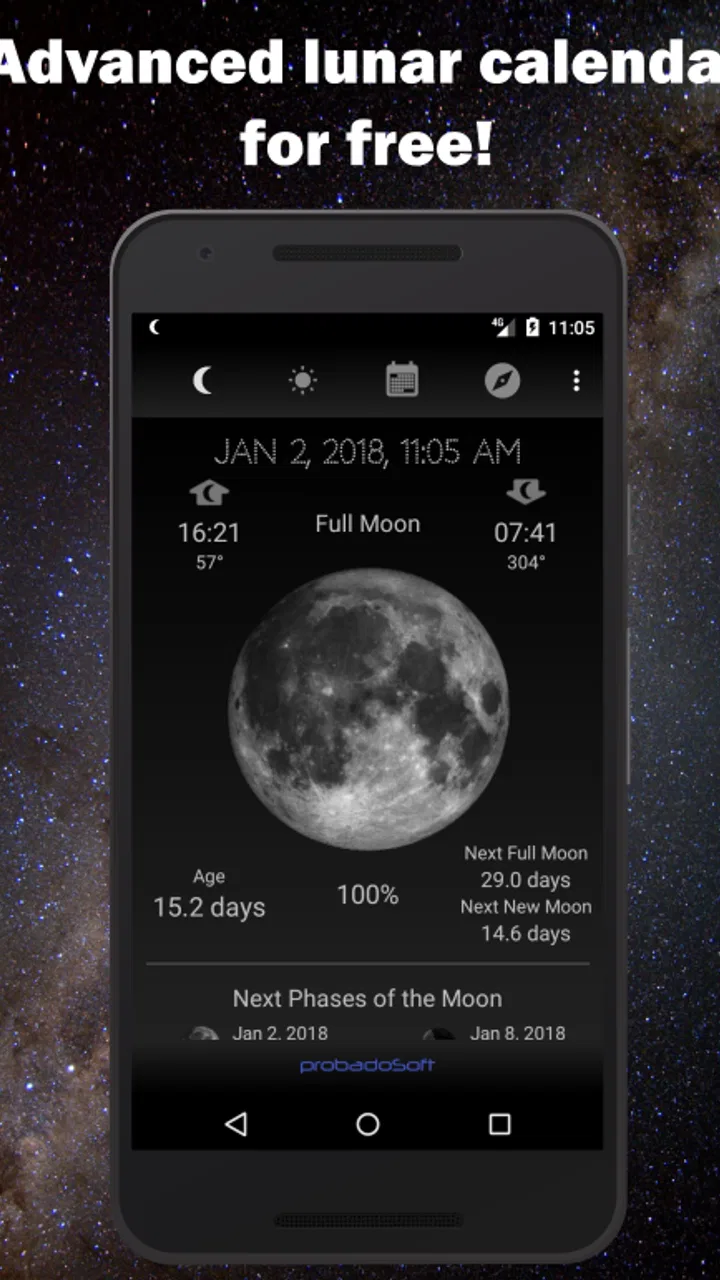
The Moon Phase Calendar app provides users with detailed information about current moon phases, including full moon, new moon, and quarter phases. It also offers additional features such as moonrise and moonset times, lunar eclipse information, and personalized reminders for upcoming moon phases. Users can track the moon’s cycle globally or for their specific location.
02Is the Moon Phase Calendar app available for both Android and iOS?
Yes, the Moon Phase Calendar app is available for download on both Android and iOS platforms. Users can easily find it in the Google Play Store for Android devices and the Apple App Store for iOS devices. The app is designed to deliver a consistent experience across both platforms, ensuring accessibility for all users.
03Does the Moon Phase Calendar app require an internet connection?
While the Moon Phase Calendar app offers offline functionality for basic features like viewing the current moon phase, some features may require an internet connection. For instance, accessing the latest updates, syncing personalized reminders, or checking global moon phase data may need connectivity. However, core functionalities remain usable offline.
04Are there any in-app purchases or subscriptions?
The Moon Phase Calendar app is free to download, but it may include optional in-app purchases or a premium subscription for enhanced features. These could include ad removal, additional customization options, or advanced lunar tracking capabilities. Users can enjoy the basic features without any cost, but premium features enhance the overall experience.
05How accurate is the Moon Phase Calendar app?
The Moon Phase Calendar app uses reliable astronomical data to ensure accuracy in displaying moon phases and related information. It is regularly updated to align with the latest scientific findings and astronomical calculations. However, minor discrepancies can occur due to variations in local time zones or daylight saving changes.
Pros
- Intuitive interface for easy navigation.
- Accurate moon phase predictions.
- Customizable notifications for events.
- Includes detailed lunar and solar data.
- Supports multiple languages.
Cons
- Limited free version features.
- Ads can interrupt user experience.
- No widget support for home screen.
- Lacks integration with other calendars.
- May drain battery with constant updates.

Moon Phase Calendar
Gallery